Registrations - How to register incoming material
The Registration table is used to record all specimens coming into the herbarium. Data about previous incoming gifts have been migrated into this table.
To create a new record, click on Interactions

Select Registrations. This will open up an empty Registration form.
Tip: In Specify, this table was called Accessions, but due to possible confusion for RBGE, it has been renamed Registrations. However, the icon for this table is still ACC.
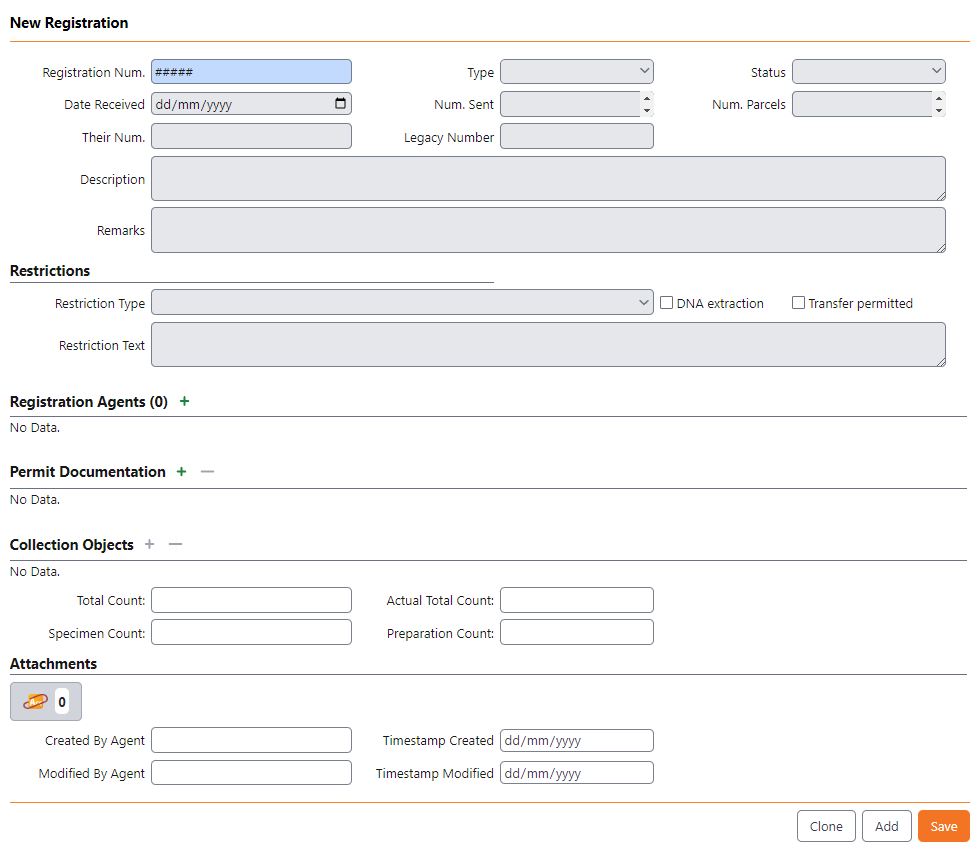
-
Registration Num.
-
Type - enter the type of registration: Exchange, Gift, RBGE Fieldwork.
-
Status - record the status of the registration event: Complete, In process.
-
Date Received - enter the date the specimens were received by RBGE.
-
Num. Sent - enter the number (an estimate is possible) of specimens received.
-
Num. Parcels - enter the number of parcels received.
- Their Num. - enter the number assigned to the gift or exchange by the donating institution if known.
- Legacy Number - this is a read-only field for the BG-BASE loan number.
- Description - enter a short description about the specimens being received.
- Remarks - enter any additional information in this field.
Restrictions section For RBGE-collected specimens this information should be available within the Permit record information in the central Collection Permit sharepoint.
- Restriction Type - this has been simplified, resulting in two options only.
- No restrictions, excluding commercial - genetic material used in compliance with the Nagoya Protocol.
- Restrictions apply - please check restrictions text or the permits for more details.
- Restriction Text - Please enter the restrictions from the permit documentation accurately and clearly. This information will be used by researchers and curators to determine future use of specimens collected under this permit to comply with the Nagoya Protocol.
Registration Agents

- Agent - enter the agents related to the receipt of the specimens, including the collector and donor
- Role - enter the role of each agent
- Remarks - enter any remarks specific to this registration for each of the agents.
Tip: Any more general remarks about the Agent should be added to the Agent record itself.
Permit Documentation

- Permit - enter the permit number from the Permit table for all relevant permits for this incoming batch of specimens.
- Remarks - enter any remarks specific to this registration for each of the permits.
Tip: Any more general remarks about the Permit should be added to the Permit record itself.
Collection Objects
Collection Objects can be added by entering the registration number into the Collection Object record.
- Total Count - autofilled and read only.
- Actual Total Count - autofilled and read only.
- Specimen Count - autofilled and read only.
- Preparation Count - autofilled and read only.
Attachments
Any documentation relating to the receipt of the specimens, including correspondence, can be uploaded as an attachment here.